




Visits List View
The Visits List View in CloudMedico provides a comprehensive table-based interface for managing all your patient visits. This powerful tool displays essential visit information in an organized, sortable format that makes it easy to find, review, and manage your practice's visit records.
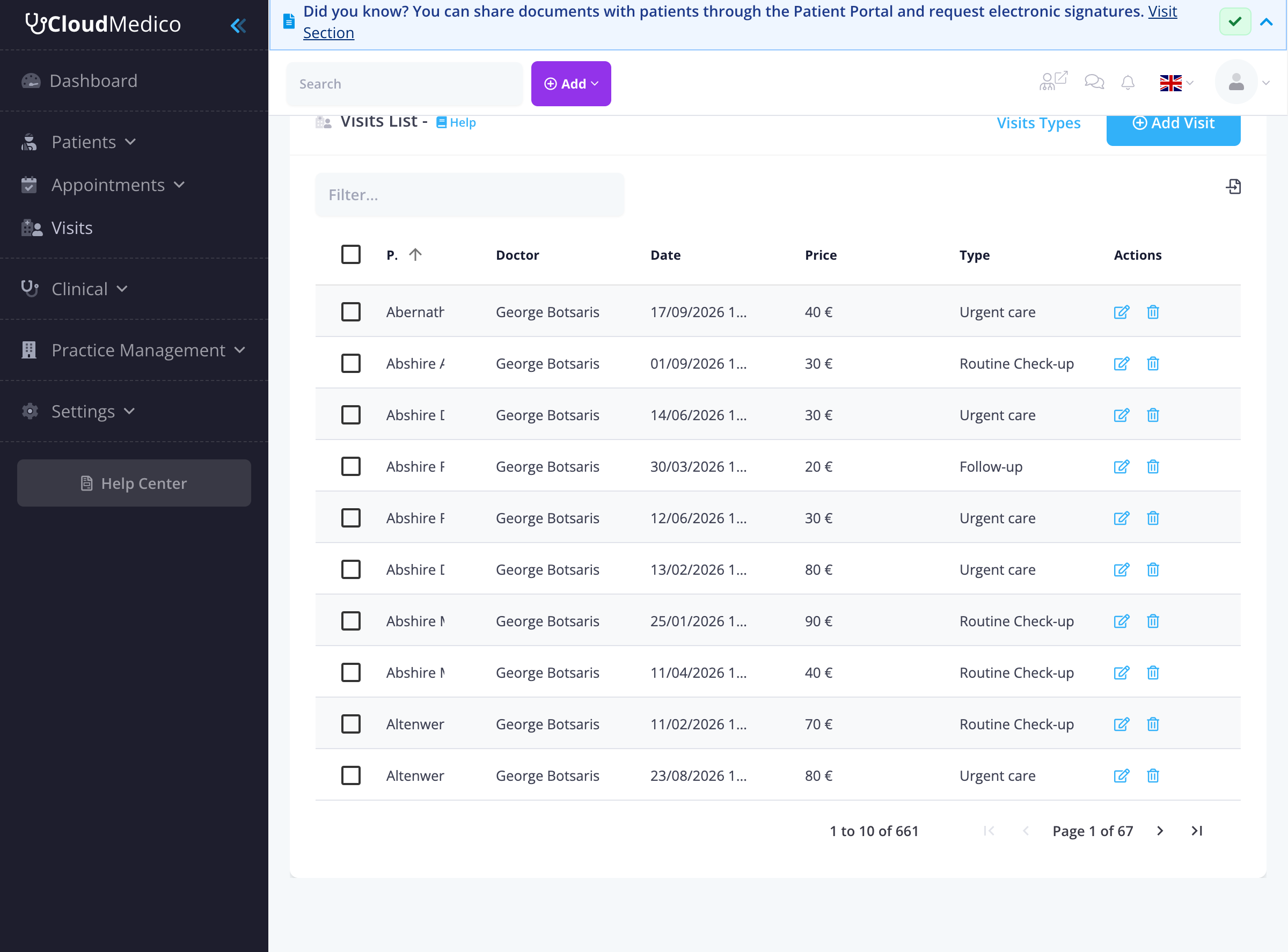
List Overview
The visits list displays key information for each visit, organized into sortable columns:
- Patient: The name of the patient, with a checkbox for selection.
- Doctor: The assigned doctor for the visit.
- Date: The date and time of the visit.
- Price: The cost of the visit.
- Type: The category of the visit (e.g., Routine Check-up, Follow-up, Urgent care).
- Actions: Icons for quick actions such as editing or deleting the visit.
Search and Filtering
Efficiently locate specific visits using the built-in search and filtering capabilities:
- Search Filter: Use the search box to quickly find specific visits by patient name, doctor, or other relevant criteria.
- Column Sorting: Click on any column header (e.g., Patient, Date, Doctor) to sort visits in ascending or descending order.
- Pagination: Navigate through large visit lists using the pagination controls at the bottom of the table.
Bulk Operations and Selection
The list view supports bulk operations, allowing you to manage multiple visits simultaneously:
- Individual Selection: Check the checkbox next to each visit to select it.
- Bulk Actions: Once visits are selected, options like 'Delete Selected' or 'Export Selected' will appear, enabling you to perform actions on multiple records at once.
Quick Actions
From the visits list, you can quickly access:
- Add Visit: Click the 'Add Visit' button to create a new visit record.
- Visit Types: Access the 'Visit Types' link to manage different types of visits.
- Edit Visit: Click the edit icon to modify an existing visit.
- Delete Visit: Click the delete icon to remove a visit record.
Tips for Managing Visits List
To optimize your use of the Visits List View:
- Regular Review: Periodically review the list to ensure all visits are up-to-date.
- Utilize Filters: Make use of search and sorting to quickly find the information you need.
- Monitor Types: Keep an eye on visit types to identify patterns in patient care.
- Bulk Actions: Use bulk actions for efficient management of multiple records.
- Price Tracking: Monitor visit prices to ensure proper billing and revenue tracking.