




Renewing your Subscription
Subscription Management Overview
The Subscription Management page provides a comprehensive view of your CloudMedico subscription status and options:
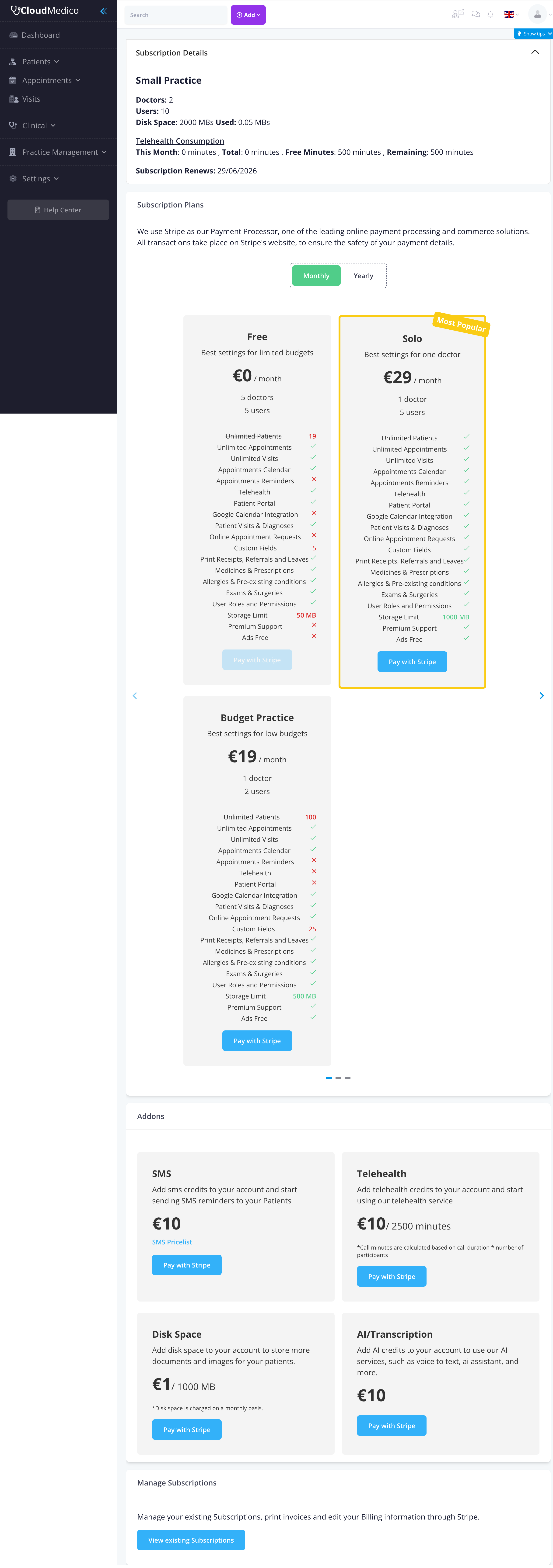
Current Subscription Status
When you register, you start on our 30-day trial with plan-0 limits, which include:
- Up to 1 Doctor
- Up to 2 Users
- Basic EHR functionality
- Patient management features
Available Subscription Plans
CloudMedico offers multiple subscription tiers to meet different practice needs:
30-Day Trial
- 1 Doctor
- 2 Users
- Core patient, appointment, visit, and portal workflows
Professional Plan
- Multiple doctors
- Multiple users
- Advanced features
- Priority support
Enterprise Plan
- Unlimited doctors and users
- All features
- Custom integrations
- Dedicated support
Upgrading Your Subscription
To upgrade your subscription:
1. Select Plan: Choose the plan that best fits your practice needs
2. Review Features: Compare features and limits between plans
3. Payment: Click 'Pay with Stripe' to complete your payment securely
4. Activation: Your new plan will be activated immediately
Secure Payment Processing
CloudMedico uses Stripe for all payment processing, ensuring:
- Security: Industry-leading security standards
- Reliability: Trusted by millions of businesses worldwide
- Compliance: PCI DSS compliant payment processing
- Multiple Payment Methods: Credit cards, debit cards, and more
Managing Existing Subscriptions
You can view and manage your existing subscription by clicking 'View existing Subscriptions'. This allows you to:
- View current subscription details
- Check payment history
- Update payment methods
- Download invoices
- Manage billing information
Downgrading Your Plan
If you need to downgrade to a plan with fewer doctors or users:
1. Remove Excess Users: First, remove any doctors or users that exceed the new plan limits
2. Subscribe to Lower Plan: Select and subscribe to the desired plan
3. Confirmation: Your new plan will be activated
Custom Plans
For practices with unique requirements, CloudMedico offers custom plans. Contact our support team to discuss:
- Custom user limits
- Specialized features
- Integration requirements
- Volume discounts
Billing and Invoices
CloudMedico provides comprehensive billing management:
- Automatic Billing: Monthly or annual billing cycles
- Invoice Generation: Automatic invoice creation
- Payment History: Complete payment tracking
- Tax Handling: Automatic tax calculation where applicable
Tips for Subscription Management
To optimize your subscription:
- Assess Needs: Regularly evaluate your practice size and feature requirements
- Plan Ahead: Consider growth when selecting a plan
- Monitor Usage: Keep track of your current usage against plan limits
- Contact Support: Reach out for help with plan selection or custom requirements
- Review Regularly: Periodically review your subscription to ensure it meets your needs