Top 10 Free Patient Management Software and Free Trials - Complete Comparison

In today’s healthcare environment, choosing the right patient management software can make or break your practice. But the cost is often prohibitive—premium solutions can run $300-500+ per month. Some products are free or open-source, while others let you evaluate the complete workflow through a time-limited free trial.
This comprehensive guide compares 10 free, open-source, and free-trial patient management options for 2025, including features, pros/cons, and which one is right for your practice type.
What is Patient Management Software?
Patient management software is a digital system that helps healthcare providers organize and streamline their practice operations. It typically includes:
- Patient Records: Centralized database of patient demographics, medical history, and contact information
- Appointment Scheduling: Calendar system for booking and managing patient visits
- Automated Reminders: Email/SMS notifications to reduce no-shows (typically by 30-80%)
- Prescription Management: Digital prescription tracking and generation
- Patient Portal: Secure online access for patients to book appointments, view records, and pay bills
- Billing & Invoicing: Invoice generation and payment tracking
- Telehealth: Built-in video consultations for remote visits
The Real Numbers: Why Patient Management Software Matters
Before diving into specific software, here’s what healthcare providers report when they switch from paper to digital:
- 📊 40-60% reduction in administrative time (more time for patient care)
- 🚫 30-80% reduction in no-shows (via automated SMS reminders)
- 💰 $5,000-15,000/year saved on paper, filing, and storage costs
- ⏰ 3+ hours/week saved per staff member on scheduling and data entry
- 😊 25-35% higher patient satisfaction scores with online portals
- 🔒 100% GDPR/HIPAA compliant data (if you choose the right provider)

How to Use This Comparison
Looking for a quick answer? Jump to the comparison table below to see side-by-side feature comparison. Want detailed reviews? Read through each option.
Your practice type matters:
- Solo practitioners: Look for ease of setup, patient portal, and automated reminders
- Small clinics (2-10 staff): Prioritize team collaboration features and custom fields
- Tech-savvy practices: Open-source options like OpenEMR offer more customization
- Non-technical users: Cloud-based solutions like CloudMedico are easiest to implement
Top 10 Free and Free-Trial Patient Management Software Options
1. CloudMedico 🏆 Best 30-Day Trial for Small Practices
Cost: 30-day free trial for up to 100 patients; paid plan required after the trial | Setup Time: 5 minutes | Platform: Cloud-based
CloudMedico is a paid patient management platform for solo practitioners and small clinics. New practices can use a 30-day free trial with the core workflows already turned on, so they can test patient records, visits, and appointments before choosing a paid plan.
Why Practices Choose CloudMedico:
- ✅ All key workflows included during the trial: Patient portal, telehealth, prescriptions, and custom fields are available while you evaluate the product
- ✅ GDPR compliant: EU-hosted, encrypted data, daily backups, DPA agreements
- ✅ Instant setup: No server configuration needed—literally 5 minutes to start
- ✅ Real support: Email support during your trial, not just community forums
- ✅ Works with integrations: Google Calendar sync, Stripe payments, SMS/email
Key Features:
- Patient management with custom fields and medical history
- Appointment scheduling with automated SMS/email reminders (reduces no-shows by up to 40%)
- Built-in video telehealth consultations
- Patient portal for appointment booking, document access, and online payments
- Prescription management with medicine catalog
- Voice-to-text AI dictation for faster documentation
- Multi-language support (English, Greek, Spanish)
Best For:
Solo practitioners, small clinics, practices in EU (especially GDPR-critical), anyone who wants "plug and play" without technical setup.
Limitations:
The free trial ends after 30 days and is limited to 100 patients. Continued use requires a paid plan. Mobile apps are responsive web (not native iOS/Android).
2. OpenEMR 🔧 Best for Tech-Savvy Practices
Cost: Free (open-source) | Setup Time: 2-4 hours | Platform: Self-hosted / Cloud
OpenEMR is the gold standard for open-source EHR/practice management software. It’s been around since 2002 and is used by thousands of practices worldwide. If you have IT support or technical expertise, OpenEMR is incredibly powerful.
Why Practices Choose OpenEMR:
- ✅ Completely open-source: No licensing costs, ever
- ✅ Highly customizable: Modify any feature to match your workflow
- ✅ Mature codebase: ONC Certified, used in hospitals and clinics worldwide
- ✅ Active community: 20+ years of development, large user community
- ✅ HIPAA-compliant: Built with US healthcare compliance in mind
Key Features:
- Complete EHR with customizable templates
- Practice management (scheduling, billing, reporting)
- Multi-provider support
- Patient portal available
- Pharmacy integration
- Lab result management
- Advanced reporting and analytics
Best For:
Practices with IT staff, developers, or technical founders. Organizations that need extensive customization or advanced analytics.
Limitations:
Steep learning curve. Requires server setup and ongoing maintenance. Community support only (no paid support tiers). Requires technical knowledge to troubleshoot.
3. GNU Health 🏥 Best Open-Source EHR
Cost: Free (open-source) | Setup Time: 2-3 hours | Platform: Self-hosted
GNU Health is a powerful open-source hospital information system and EHR. Originally designed for public health and hospitals, it now serves small practices and clinics globally.
Why Practices Choose GNU Health:
- ✅ Focused on public health: Strong emphasis on patient rights and social medicine
- ✅ Multi-language support: Available in 50+ languages
- ✅ Affordable in developing countries: Built to work with limited resources
- ✅ Active development: Regular updates and community support
Key Features:
- Patient demographics and medical history
- Visit documentation
- Prescription management
- Lab and imaging integration
- Multi-language interface
- Reporting and statistics
Best For:
International practices, public health organizations, clinics in developing countries, practices prioritizing open-source philosophy.
Limitations:
Requires technical setup. Smaller community compared to OpenEMR. Limited appointment scheduling features compared to other options. Steeper learning curve.
4. FreeMED 📋 Best Lightweight Open-Source
Cost: Free (open-source) | Setup Time: 1-2 hours | Platform: Self-hosted / Cloud
FreeMED is a streamlined, user-friendly open-source practice management solution. It strikes a good balance between power and simplicity compared to OpenEMR.
Why Practices Choose FreeMED:
- ✅ Easier than OpenEMR: Simpler interface, faster to set up
- ✅ Modern design: Responsive interface that works on mobile
- ✅ Good documentation: Better than average open-source project
- ✅ Active development: Regular updates and improvements
Key Features:
- Patient information management
- Appointment scheduling
- Visit documentation
- Billing and invoicing
- Pharmacy integration
- Customizable reporting tools
Best For:
Practices wanting open-source flexibility but simpler than OpenEMR. Good middle ground between ease-of-use and customization.
Limitations:
Still requires some technical setup. Smaller community than OpenEMR. Patient portal features are basic. No built-in telehealth.
5. ChARM EHR ☁️ Best for Cloud Simplicity
Cost: Free (limited) / Freemium | Setup Time: 10 minutes | Platform: Cloud-based
ChARM EHR is a cloud-based solution offering a free version for small practices. It’s designed with simplicity in mind for solo practitioners.
Why Practices Choose ChARM EHR:
- ✅ Cloud-based: No installation needed, access from anywhere
- ✅ Simple interface: Minimal learning curve
- ✅ Mobile access: Works well on tablets and smartphones
- ✅ Patient portal included: Even in free version
Key Features:
- Cloud-based electronic health records
- Patient scheduling with reminders
- Secure patient messaging
- Patient portal access
- Basic billing
- Third-party integrations
Best For:
Solo practitioners who want simplicity. Practices that don’t need advanced features. Clinics prioritizing ease-of-use over customization.
Limitations:
Free version has significant limitations (patient limit, feature restrictions). Advanced features require paid upgrade. Limited customization. Support is minimal on free tier.
6. Practice Fusion 🔍 Best for Reporting & Analytics
Cost: Free (limited) / Freemium | Setup Time: 15 minutes | Platform: Cloud-based
Practice Fusion is one of the first cloud-based EHRs and offers a truly free tier. It emphasizes strong reporting and practice analytics.
Why Practices Choose Practice Fusion:
- ✅ Genuine free tier: No credit card required (unusual for US software)
- ✅ Strong reporting: Excellent dashboards and analytics tools
- ✅ e-Prescribing: Direct integration with pharmacy networks (US-focused)
- ✅ HL7 compatible: Easy data exchange with other systems
Key Features:
- Electronic health records
- Appointment scheduling
- e-Prescribing to pharmacy networks
- Patient portal
- Advanced reporting and dashboards
- Templates and customizable workflows
Best For:
US-based practices wanting strong reporting. Clinics that need e-prescribing integration. Data-driven practices that want deep analytics.
Limitations:
US-focused (not ideal for EU practices). Free tier is limited. Premium features unlock quickly. Support is chat-based, not email/phone.
7. Medidata/NEXTECH 💼 Best for Group Practices
Cost: Freemium (limited free tier) | Setup Time: 20 minutes | Platform: Cloud-based
Medidata (now part of NextEra) offers cloud-based solutions designed to scale from solo practices to medium-sized groups.
Why Practices Choose Medidata:
- ✅ Scalable: Grows with your practice from 1 to 100+ staff
- ✅ Team collaboration: Built for group practices with role-based permissions
- ✅ Integrations: Works with major EHR and accounting systems
- ✅ Mobile apps: Native iOS and Android apps available
Key Features:
- Patient records and history
- Appointment scheduling for multiple providers
- Team workflows and task management
- Patient portal
- Reporting and analytics
- API for custom integrations
Best For:
Group practices and clinics with multiple providers. Organizations needing team collaboration and workflow management.
Limitations:
Free tier is very limited (encourages quick upgrade). Pricing becomes expensive as you grow. Setup more complex than simple solo tools.
8. TrustWave CareCloud ☁️ Best for Enterprise Features
Cost: Freemium (limited) | Setup Time: 30 minutes | Platform: Cloud-based
CareCloud is positioning itself as an affordable alternative to Epic/Cerner for practices scaling to enterprise level.
Why Practices Choose CareCloud:
- ✅ Enterprise features: Advanced workflows and automation
- ✅ Billing integration: Medical billing management included
- ✅ Interoperability: HL7, FHIR compatible
- ✅ AI/Analytics: Built-in machine learning for insights
Key Features:
- Full EHR with advanced customization
- Scheduling and resource management
- Integrated billing and financial management
- Patient portal
- Analytics and business intelligence
- Telehealth capabilities
Best For:
Medium to large practices (50+ providers). Organizations needing tight billing integration. Clinics wanting advanced automation and AI features.
Limitations:
Free tier is extremely limited. Quickly requires upgrade. More expensive than other options. Overkill for solo practitioners.
9. EasyPractice 📅 Best for Practitioners & Therapists
Cost: Free (2 clients max) / Freemium | Setup Time: 5-10 minutes | Platform: Cloud-based
EasyPractice is a cloud-based booking and practice management software specifically tailored towards practitioners, therapists, and specialists. Since 2012, it has helped over 20,000 customers manage bookings, invoices, and journals for more than 1 million clients. The platform is 100% GDPR compliant and offers a genuinely free tier to get started.
Why Practices Choose EasyPractice:
- ✅ True free tier: Free access with up to 2 clients—perfect for testing the platform
- ✅ GDPR compliant: 100% GDPR compliant with secure messaging, two-factor authentication, and consent management
- ✅ Quick setup: Cloud-based platform means instant access—no server configuration needed
- ✅ Online booking: Clients can book appointments directly through online booking, automatically appearing in your calendar
- ✅ Integrated payments: EasyPay app allows clients to pay directly through EasyPractice with credit cards
- ✅ Trusted platform: Used by over 51,000 companies worldwide with excellent ratings (4.7+ stars)
Key Features:
- Online booking system with automatic calendar sync
- Client management and organization
- Invoicing with online payment processing (EasyPay)
- Secure journal system for client notes and interactions
- Free SMS reminders to reduce no-shows
- Event administration for classes and group sessions
- Google Calendar integration
- Email notifications
- Statistics and reporting
- Employee management with role-based access
Best For:
Practitioners, therapists, specialists, wellness professionals, physiotherapists, and solo practices. Particularly popular in Europe (Denmark, Norway, Sweden, UK) but available globally. Ideal for practices that prioritize online booking and client self-service.
Limitations:
Free tier limited to 2 clients (designed for testing). Paid plans start at €21/month for unlimited access (up to 500 appointments). More focused on booking and scheduling than comprehensive EHR features. No built-in telehealth video consultations.
10. Nextgen Office Emr (Free Tier) 🚀 Best for Practices Ready to Scale
Cost: Freemium (limited) | Setup Time: 20-30 minutes | Platform: Cloud-based
Nextgen (now part of Qehr) offers a cloud-based EHR with a genuinely free tier for small practices, specifically designed to accommodate growth without data migration.
Why Practices Choose Nextgen Office EMR:
- ✅ Growth without migration: Scale from free to paid plans without moving data
- ✅ Patient engagement: Strong patient portal and appointment reminder tools included
- ✅ Integration-ready: Works with major EHR networks and insurance systems
- ✅ Modern interface: Contemporary UX designed for non-technical users
- ✅ Mobile-first: Native mobile apps for iOS and Android
Key Features:
- Electronic health records with customizable templates
- Appointment scheduling and management
- Patient portal with messaging and payment options
- Prescription management
- Visit documentation and clinical notes
- Basic billing and invoicing
- Integration with major pharmacy and insurance networks
Best For:
Practices planning to grow and scale. Clinics wanting modern patient engagement tools. Organizations needing strong integration with healthcare networks and insurance.
Limitations:
Free tier is moderately limited (number of users, patients, or storage). Premium features require upgrade. Support is primarily digital (chat/email, not phone). Some advanced analytics behind paywall.
Quick Comparison Table
Comprehensive Feature Comparison Table (17 Key Features)
This table compares the 10 best free patient management software across essential features that matter to healthcare practitioners:
| Feature | CloudMedico | OpenEMR | GNU Health | ChARM | Practice Fusion |
|---|---|---|---|---|---|
| Cost | 30-day free trial (100 patients) | Free | Free | Free (Limited) | Free (Limited) |
| Platform Type | Cloud-based | Self-hosted | Self-hosted | Cloud-based | Cloud-based |
| Setup Time | 5 minutes | 2-4 hours | 2-3 hours | 10 minutes | 15 minutes |
| Quick Patient Onboarding | ✅ Full | ✅ Full | ✅ Full | ✅ Full | ✅ Full |
| Easy Appointment Scheduling | ✅ Calendar & List | ✅ Full | ✅ Basic | ✅ Full | ✅ Full |
| Comprehensive Patient Visits | ✅ Full | ✅ Full | ✅ Full | ✅ Basic | ✅ Full |
| Patient Prescriptions | ✅ Full | ✅ Full | ✅ Full | ✅ Full | ✅ e-Rx Network |
| Patient Portal & Access | ✅ Full | ✅ Full | ⚠️ Limited | ✅ Full | ✅ Full |
| Telehealth (Video Visits) | ✅ Built-in | ⚠️ Third-party | ❌ No | ⚠️ Limited | ⚠️ Limited |
| Patient Documents Management | ✅ Full | ✅ Full | ⚠️ Basic | ⚠️ Limited | ✅ Full |
| Invoices Management | ✅ Full | ✅ Full | ✅ Basic | ⚠️ Limited | ✅ Full |
| Comprehensive Reports | ✅ Advanced | ✅ Advanced | ✅ Basic | ⚠️ Limited | ✅ Advanced |
| Custom Fields & Templates | ✅ Unlimited | ✅ Unlimited | ⚠️ Limited | ✅ Limited | ✅ Limited |
| Email & SMS Reminders | ✅ SMS/Email | ✅ SMS/Email | ⚠️ Limited | ✅ SMS/Email | ✅ SMS/Email |
| Online Patient Payments | ✅ Stripe | ⚠️ Limited | ❌ No | ⚠️ Limited | ✅ Full |
| Voice-to-Text Transcription | ✅ AI-Powered | ❌ No | ❌ No | ❌ No | ❌ No |
| Security & Compliance | ✅ GDPR | ✅ HIPAA | ✅ HIPAA | ✅ HIPAA | ✅ HIPAA |
| BEST FOR | Solo/EU | Tech-Savvy | Nonprofits | Simple | US Clinics |
Legend: ✅ = Fully supported | ⚠️ = Limited/Partial | ❌ = Not supported
Key Considerations When Choosing Free Patient Management Software
1. Data Security & Compliance
Healthcare data is sensitive. Before choosing any software, verify:
- GDPR Compliance: Is data hosted in EU? Is there a Data Protection Agreement? Do they allow data portability?
- HIPAA Compliance: For US practices, is it HIPAA-certified? Do they sign Business Associate Agreements (BAAs)?
- Encryption: Is data encrypted in transit (SSL/TLS) and at rest? Who holds encryption keys?
- Backups: How often is data backed up? Can you restore it yourself?
- Access Controls: Can you control who has access to patient data? Are there audit logs?
2. Ease of Setup & Use
The best software is useless if your staff won’t use it.
- Cloud vs Self-Hosted: Cloud = instant access (no IT needed). Self-hosted = more control but requires server knowledge.
- Mobile Access: Can your staff use it on phones/tablets? Essential for telehealth and remote work.
- Learning Curve: Can non-technical staff learn it in an hour? Or will training take weeks?
- Trial Period: Can you test it before committing? How long can you use the free version?
3. Support & Community
When something breaks, you need help fast.
- Free support tier: Email? Chat? Forum? Phone?
- Response times: Do they commit to 24-hour response for free users?
- Community: Is there an active user community? How many Stack Overflow questions answered?
- Documentation: Are there guides, video tutorials, and FAQs?
4. Integration Capabilities
Your practice probably uses other tools (accounting software, payment processors, calendar apps). Can they integrate?
- Common integrations: Google Calendar, Stripe, Zapier, email providers
- API availability: Can you build custom integrations if needed?
- Data import/export: Can you easily move your data if you switch software?
- Pharmacy networks: Can prescriptions be sent directly to pharmacies (US)?
5. Scalability & Future-Proofing
Your practice will grow. Will the software grow with you?
- Patient limits: Does the starter access allow 100 patients? 500? Unlimited?
- Staff users: Can you add more doctors and staff as you grow?
- Upgrade path: If you outgrow the trial or starter plan, can you upgrade to paid versions?
- Data migration: If you upgrade, will your existing data transfer cleanly?
6. Real vs "Freemium" Solutions
Not all "free" software is equally free:
- True Free Plans: Unlimited access to features within stated limits, usually through open-source or long-term freemium models
- Freemium Traps: Appear free but gate critical features behind paywall (e.g., patient portal requires paid upgrade)
- Free Trial: Full workflows for 30-60 days, then requires a paid plan (e.g., CloudMedico's 30-day trial)
- Open Source: Code is free, but setup/hosting may cost you time and money

Free vs Paid: When to Upgrade
Most free solutions can work indefinitely for small practices. But certain scenarios call for paid software:
| Scenario | Stay with Free | Upgrade to Paid |
|---|---|---|
| Number of Patients | < 100 | > 200 |
| Staff Members | 1-2 | 3+ |
| Storage Needs | < 50 GB | > 500 GB |
| Advanced Billing | Manual invoicing OK | Insurance claim automation needed |
| Dedicated Support | Community support OK | Dedicated account manager needed |
| Custom Integrations | Built-in integrations sufficient | Custom API integrations needed |
Pro tip: Use your first 30 days to add a real patient, book an appointment, and test follow-up workflows. That gives you the clearest signal on whether CloudMedico fits your practice before you choose a paid plan.
Frequently Asked Questions About Free and Free-Trial Patient Management Software
Q: Is free patient management software really free, or is there a catch?
A: It depends. Some tools are truly free or open-source, while others use trials or freemium models. CloudMedico offers a 30-day trial with core workflows enabled, while options like OpenEMR and GNU Health remain open-source. Always check whether your must-have features are available before committing.
Q: Can I trust free software with patient data? Is it secure?
A: Yes, if you choose established providers. CloudMedico is GDPR-certified. OpenEMR is HIPAA-compatible. Practice Fusion is ONC-certified. The key is checking their security credentials and compliance certifications.
Q: How long can I stay on the starter plan or trial?
A: It varies by product. CloudMedico gives you 30 days to evaluate the platform with real workflows. OpenEMR is open-source and can remain free indefinitely. Practice Fusion and ChARM use different freemium or upgrade models, so always verify the exact limits before relying on them long term.
Q: Can I migrate my data if I switch software?
A: Usually yes. Most patient management software supports CSV export/import. However, some custom fields or complex data may require manual effort. Always verify migration support before committing to a new system.
Q: Do I need IT knowledge to set up free or free-trial EHR software?
A: Not for cloud-based solutions (CloudMedico, ChARM, Practice Fusion). You need IT expertise for self-hosted open-source options (OpenEMR, GNU Health). Choose based on your comfort level.
Q: Which is better: OpenEMR or CloudMedico?
A: Depends on your needs. CloudMedico if you value ease-of-use, patient portal, and telehealth. OpenEMR if you need deep customization and have technical staff. For most practices: CloudMedico. For tech-savvy teams: OpenEMR.
Conclusion: Choosing the Right Free or Free-Trial Patient Management Software
The best patient management software is the one your practice will actually use. Here’s the decision framework:
- Identify your must-haves: Patient portal? Telehealth? Prescription management? Compliance (GDPR/HIPAA)?
- Check the comparison table above against your must-haves
- Test the top 2-3 candidates with your actual workflow (start a free plan or trial, import sample data, schedule test appointments)
- Make a decision based on ease of use, not just features (software your staff will use beats feature-rich software that sits unused)
- Plan your upgrade path in 1-2 years (as your practice grows, you may need paid plans)
For small practices and solo practitioners that want to test a complete cloud workflow: CloudMedico offers a 30-day free trial for up to 100 patients. A paid plan is required to continue after the trial.
For tech-savvy teams that want unlimited customization: OpenEMR is the gold standard of open-source EHR/practice management.
For everything in between: Use the comparison table to find your perfect fit.
The healthcare landscape is changing rapidly. Modern patient management software now comes in several entry models, from open-source tools to freemium products to trial-led platforms like CloudMedico. Choose the model that matches your practice stage, and your team will feel the difference quickly.
Ready to get started? Choose a free plan, an open-source product, or a free trial based on how long you need to evaluate the software. CloudMedico’s 30-day trial takes less than 5 minutes to set up and does not require a credit card.
Trusted by healthcare professionals all over the world





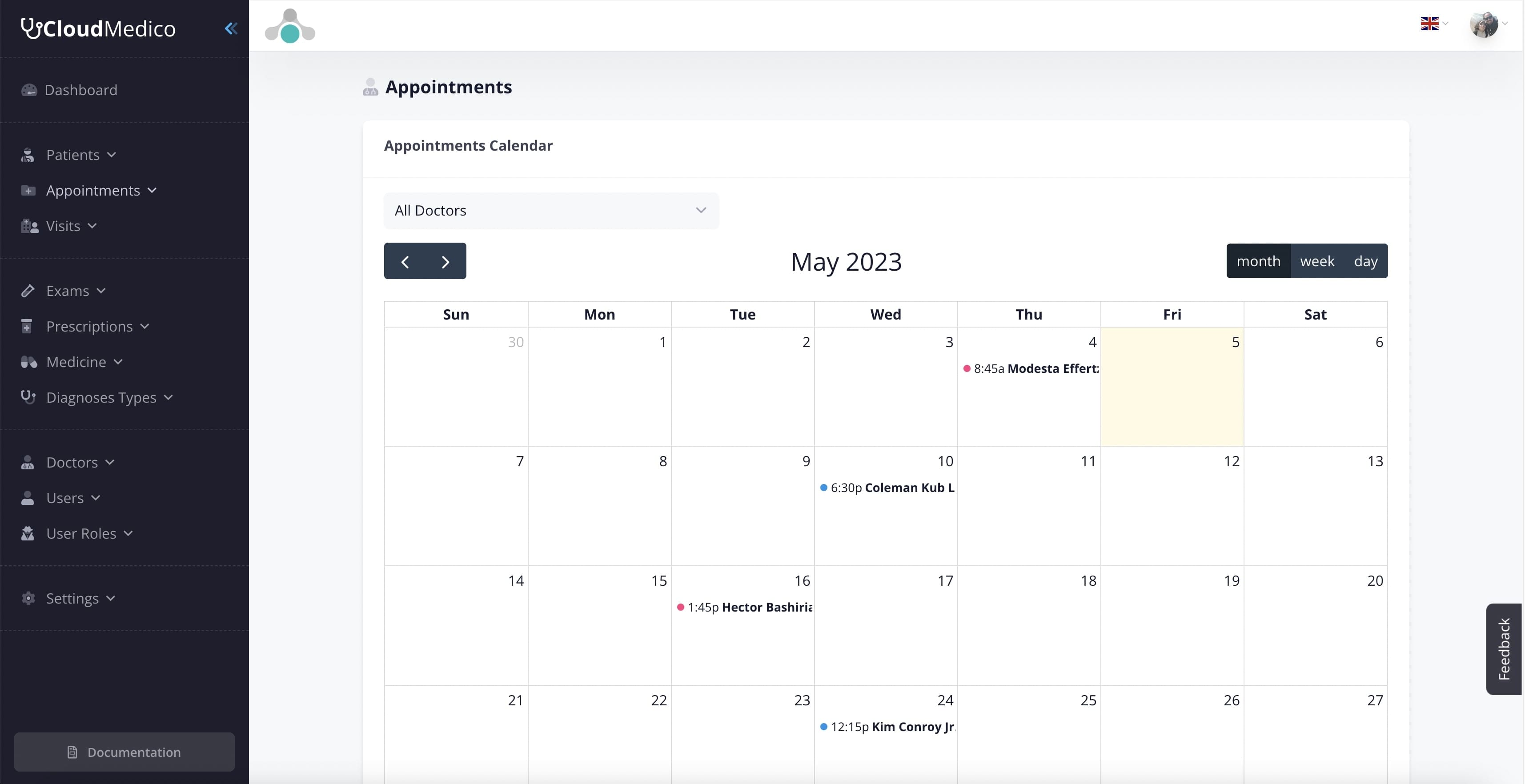
Easy Appointments Management
Latest from our Blog
Read all our latest news and takes on some industry topics.

What Is MCP in Healthcare? A Guide for Doctors and Medical Practices

Securely Connect ChatGPT and Claude to Your EHR with CloudMedico
