Free Medical Office Software: Complete Guide to Selection and Use

In the modern era, digitizing medical services has become essential for the effective operation of every medical practice. However, the cost of professional software can be a barrier, especially for new or small practices. Fortunately, there are reliable free solutions that can meet the basic needs of a medical office. In this article, we'll explore the benefits of free software for medical practices, the selection criteria, and present the best available options in the market.
The Benefits of Free Software for Medical Practices
Choosing free software for your medical practice offers multiple advantages that can significantly improve your practice's operations:
- Cost savings: An obvious benefit, especially for new practices trying to minimize initial expenses.
- Try before you buy: Many free software options are offered as basic versions of premium products, allowing you to test functionality before investing.
- Basic functionality: They cover the fundamental needs of patient management and appointments.
- Digitization of records: Transition from handwritten systems to digital ones, improving organization and reducing errors.
- Increased productivity: Even free versions can automate repetitive tasks and save valuable time.
Types of Free Software for Medical Practices
There are various types of free software that can serve different needs of a medical practice:
- Patient management systems: Allow the registration and organization of patient information, medical history, and visits.
- Appointment scheduling software: Facilitate the management of the practice's calendar and patient appointments.
- Electronic medical record systems (EMR/EHR): Enable digital recording and storage of patients' medical history.
- Electronic prescription applications: Facilitate the process of prescribing medications and referrals.
- Billing and financial management software: Help track the financial transactions of the practice.
Selection Criteria for Free Software
When choosing free software for your medical practice, it's important to consider the following criteria:
- Security and data protection: Ensure the software complies with GDPR and offers adequate protection for sensitive medical data.
- Available features: Evaluate if the offered features cover the basic needs of your practice.
- Limitations: Understand the limitations of the free version (e.g., number of patients, available storage space).
- User-friendliness: Choose software with an intuitive interface that requires minimal training.
- Upgrade possibility: Consider if there's an option to upgrade to a premium version as your practice grows.
- Support: Check the availability of technical support and educational materials.
- Compatibility: Make sure the software is compatible with your practice's existing systems and equipment.
Top Free Software Solutions for Medical Practices
Below we present the best free software solutions for medical practices available in the market:
1. CloudMedico 30-Day Trial
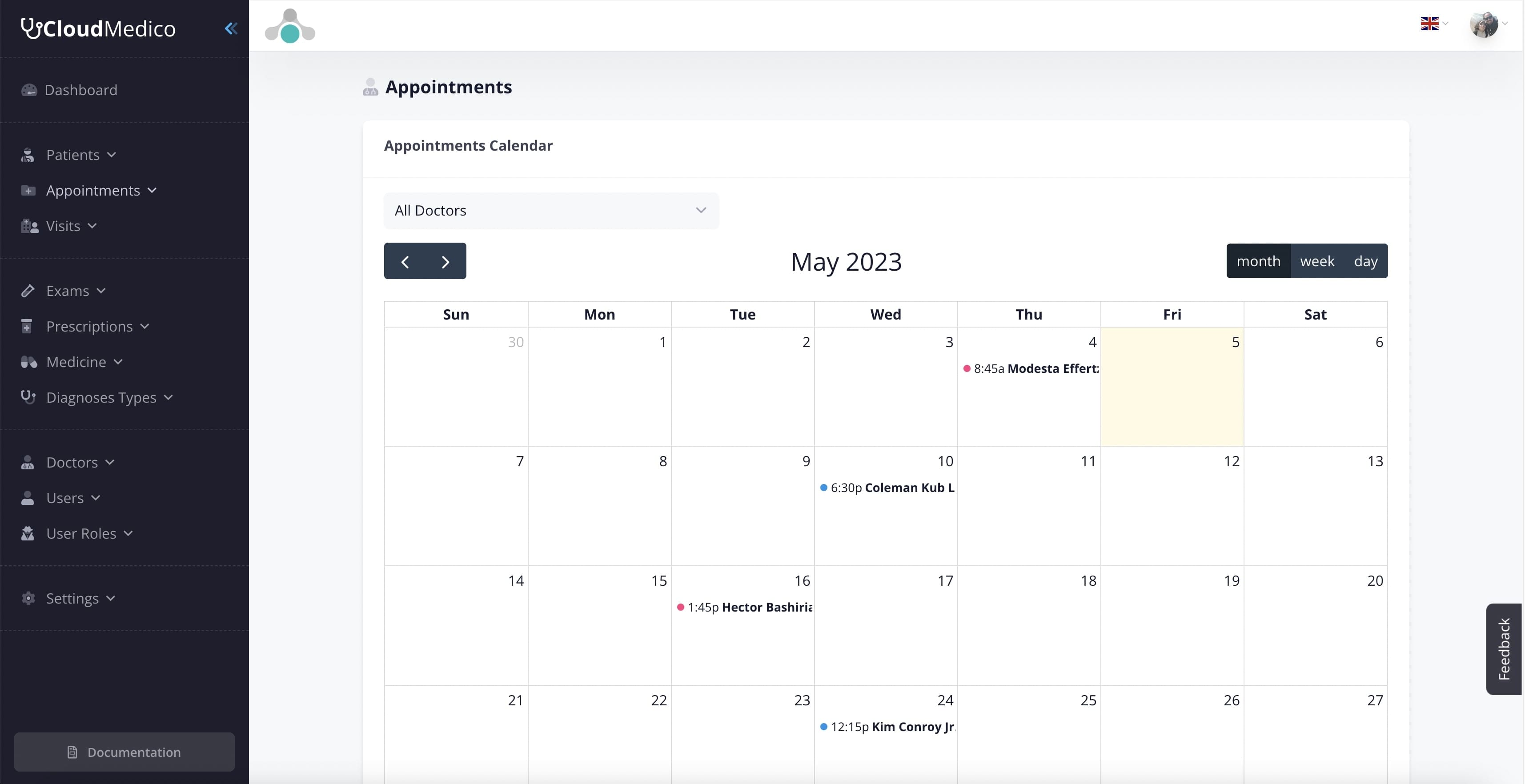
CloudMedico offers a 30-day trial of its comprehensive medical practice management system, specifically designed for small practices.
- Key features: Patient management, appointment scheduling, basic electronic medical records, reminders.
- Advantages: User-friendly interface, GDPR compliant, designed for the local market, excellent support.
- Limitations: Limited to 100 patients during the 30-day trial, with continued access requiring a paid plan after the trial ends.
- Ideal for: New practices, solo practitioners, small clinics looking for a comprehensive solution.
2. OpenEMR
OpenEMR is an open-source electronic health records and medical practice management solution used worldwide.
- Key features: Patient demographics, scheduling, electronic medical records, prescriptions, billing.
- Advantages: Completely free, highly customizable, strong community support, regular updates.
- Limitations: Steeper learning curve, requires technical knowledge for installation and maintenance.
- Ideal for: Practices with technical staff or IT support, those needing extensive customization.
3. Practo Ray Free
Practo offers a free version of its practice management software with basic functionality for small practices.
- Key features: Appointment management, patient records, calendar integration.
- Advantages: Easy to use, cloud-based with mobile access, modern interface.
- Limitations: Limited patient records, no prescription module in free version, limited support.
- Ideal for: Individual practitioners, practices focusing primarily on appointment management.
4. Bahmni
Bahmni is an open-source hospital system designed for healthcare providers in resource-constrained environments.
- Key features: Registration, outpatient management, inpatient management, laboratory, pharmacy.
- Advantages: Comprehensive solution, adaptable to various healthcare settings, active development.
- Limitations: Complex to set up, primarily designed for hospitals rather than small practices.
- Ideal for: Larger practices, multi-specialty clinics, small hospitals.
5. FreeMED
FreeMED is an open-source electronic medical record and practice management system with a long history.
- Key features: Patient management, scheduling, document management, reporting.
- Advantages: Mature software with proven track record, extensible architecture.
- Limitations: Less frequent updates, older interface, requires technical knowledge to implement.
- Ideal for: Practices with specific needs that can be addressed through customization.
| Software | Best For | Key Strengths | Limitations | Ease of Use |
|---|---|---|---|---|
| CloudMedico Trial | New & small practices | User-friendly, local market focus | 100 patient limit | ★★★★★ |
| OpenEMR | Practices with IT support | Highly customizable, comprehensive | Technical complexity | ★★★☆☆ |
| Practo Ray Free | Solo practitioners | Simple interface, mobile access | Limited features | ★★★★☆ |
| Bahmni | Larger practices | Comprehensive, adaptable | Complex setup | ★★☆☆☆ |
| FreeMED | Specific customization needs | Mature, extensible | Older interface | ★★★☆☆ |
Installation and Usage Guide
The installation and use of free software for medical practices may vary depending on your choice, but here are some general guidelines:
Installation Steps
- Software selection: Evaluate the needs of your practice and choose the appropriate software.
- Account creation: For web applications like CloudMedico, register and create an account.
- Installation: For software requiring installation, follow the program's instructions.
- Parameter configuration: Customize the software to your practice's needs (operating hours, specialties, services).
- Data entry: Enter the basic data of your practice and your patients.
Tips for Effective Use
- Staff training: Ensure all staff are familiar with the software.
- Regular updates: Keep the software updated for optimal performance and security.
- Backup creation: Ensure regular backups of your data.
- Gradual transition: If transitioning from a manual system, proceed gradually to avoid disruptions to your practice's operation.
- Utilize educational materials: Use available guides and tutorial videos.
Transitioning from Older Systems
Transitioning from manual or older digital systems requires careful planning:
- Recording existing data: Evaluate the data that needs to be transferred.
- Prioritize critical data: Start with the most important data (e.g., current patients).
- Parallel operation: Maintain the old system alongside the new one for a period.
- Accuracy check: Verify the accuracy of transferred data.
Limitations and Challenges
Despite the many advantages, free software for medical practices has certain limitations and challenges you should be aware of:
- Limited functions: Free versions often offer only basic functions, with advanced features available in paid versions.
- Usage limits: There may be restrictions on the number of patients, users, or data volume.
- Limited support: Technical support for free software is often limited or non-existent.
- Security issues: Some free software may not offer the same level of security as paid alternatives.
- Advertisements: Some free software includes advertisements that may affect the user experience.
When to Upgrade to a Paid Version
There are certain indicators suggesting it might be time to upgrade to a paid version:
- Increasing number of patients: When you're approaching the limits of a starter plan or trial.
- Need for advanced features: When you need features not available in the starter plan or trial.
- Security requirements: When you need enhanced security measures for sensitive data.
- Need for specialized support: When immediate and specialized technical support is required.
- Practice expansion: When your practice is growing and management needs become more complex.
Case Studies
Case Study 1: Small General Practice
Dr. Johnson, a general practitioner who recently opened his own practice, chose CloudMedico's 30-day trial to manage his early patient base. With limited initial resources, he was able to digitize his appointment scheduling and patient records quickly, validate the workflow in real conditions, and then move to a paid plan once the system became part of his day-to-day operations.
Case Study 2: Multi-Specialty Clinic
Healthpoint Clinic, with three specialists and two nurses, started with OpenEMR to manage their diverse patient needs. Their IT-savvy office manager was able to customize the system to accommodate different specialties. While the initial setup required significant effort, the clinic now benefits from a comprehensive system that handles everything from scheduling to billing without monthly fees.
Conclusion and Recommendations
Free software for medical practices offers a viable starting point for digitizing your practice's operations, particularly for new or small practices with limited budgets. While these solutions have limitations compared to their paid counterparts, they can effectively meet basic needs and provide a foundation for future growth.
For most small practices, a user-friendly solution like CloudMedico's 30-day trial provides a strong way to validate fit before paying. Practices with specific needs or technical expertise might benefit from more customizable options like OpenEMR or Bahmni.
Remember to prioritize data security, ease of use, and the potential for future growth when making your selection. Start with a clear assessment of your practice's specific needs and choose a solution that aligns with those requirements.
The digital transition in practice management is no longer a luxury but a necessity in the modern medical environment. Free software offers an affordable entry point into this digital transformation journey.
Frequently Asked Questions (FAQ)
Are free software solutions safe for medical data?
Reliable free software for medical practices offers basic security measures, but may not have the advanced security features of paid alternatives. It's important to choose software that complies with GDPR and implement additional security measures such as strong passwords and regular backups.
How difficult is the transition from a manual system?
The transition requires careful planning and effort, but most modern software is designed to be user-friendly. A gradual approach is recommended, starting with transferring basic data and operating both systems in parallel for a period. Staff training is also critical for a successful transition.
Can I transfer my data if I decide to change software?
Most modern software offers data export capabilities in standardized formats such as CSV or XML. However, the complete transfer of all data and their relationships may be more complex. It's important to check the export and import capabilities before choosing software.
What happens if the company stops supporting the free software?
This is a real risk with free software. To mitigate this risk, choose software from established companies with good reputations or open-source software with an active support community. Also, maintain regular backups of your data in formats that can be imported into other systems.
Is free software compatible with local regulations?
Many international free software solutions may not be fully adapted to local requirements, such as integration with national electronic prescription systems. However, there are local solutions like CloudMedico that are specifically designed for the local market and comply with local regulations and requirements.
Trusted by healthcare professionals all over the world





Easy Appointments Management
Latest from our Blog
Read all our latest news and takes on some industry topics.
What Is MCP in Healthcare? A Guide for Doctors and Medical Practices
Securely Connect ChatGPT and Claude to Your EHR with CloudMedico